Database Administration
Installation is day one. Administration is every other day — and it is where a database quietly stops being trustworthy: a privilege granted "temporarily" two years ago, a replica stopped for three weeks, a disk at 92%, a version with a known CVE, an ALTER TABLE that locked the largest table in the system at peak hour.
Administration, here, is the set of routines that prevent each of those.
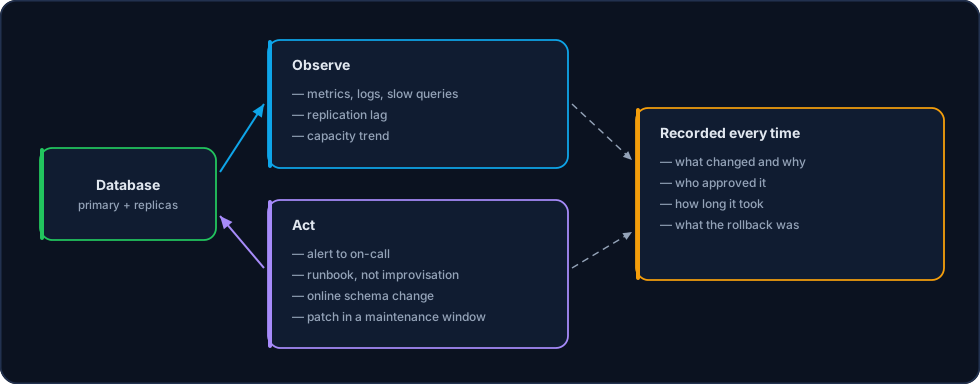
Every action starts from an observed signal and comes back as a record. Nothing is resolved in the terminal alone.
Continuous routines
| Routine | Frequency | What it prevents |
|---|---|---|
| Replication and lag check | Continuous, with alerting | A stopped replica discovered at failover time |
| Backup and restore verification | Daily / monthly | A corrupt backup discovered during the disaster |
| Space and growth review | Weekly | A full disk, which blocks writes and takes the database down |
| Slow query review | Weekly | Gradual degradation until it becomes an incident |
| User and privilege review | Quarterly | Accumulated access from people who have left |
| Security patching | On a planned window | Exposure to a known vulnerability |
| Failover drill | Every six months | A DR plan that only exists on paper |
Users and privileges
The standard model separates three kinds of account:
- Application account — privileges only over the data it needs (
SELECT,INSERT,UPDATE,DELETEon its schema). NoSUPER, noSUPERUSER, noDROP DATABASE. - Named administrative account — one per person, never shared. That is what makes auditing useful:
rootdoesn't tell you who did it. - Service account — backup, monitoring and replication, each with the minimum required and a rotated password.
-- PostgreSQL: an application role with no administrative privilege
CREATE ROLE app_orders LOGIN PASSWORD :'password';
GRANT CONNECT ON DATABASE orders TO app_orders;
GRANT USAGE ON SCHEMA public TO app_orders;
GRANT SELECT, INSERT, UPDATE, DELETE ON ALL TABLES IN SCHEMA public TO app_orders;
ALTER DEFAULT PRIVILEGES IN SCHEMA public
  GRANT SELECT, INSERT, UPDATE, DELETE ON TABLES TO app_orders;
A privilege granted during an incident needs an expiry date
Emergency grants are legitimate; what is not legitimate is one surviving the incident. Every temporary grant enters the change log with a revocation deadline.
Schema changes without stopping the application
ALTER TABLE on a large table is the most common cause of self-inflicted downtime. Depending on the version and the operation, it rewrites the whole table while holding a lock — and the application stops.
The standard procedure:
- Classify the operation — some are instant (adding a column with a default on recent versions), others rewrite the table.
- Use an online tool when it rewrites —
gh-ostorpt-online-schema-changeon MySQL; on PostgreSQL, the pattern of creating a new column, backfilling in batches and swapping. - Non-blocking indexes —
CREATE INDEX CONCURRENTLYon PostgreSQL; online creation on MySQL. - Backfill in batches — never a single
UPDATEover millions of rows: small batches, with pauses, so the transaction log and the replication lag don't blow up. - Compatibility in both directions — the new schema must work with both the old and the new code, so that the deploy and the schema migration can be rolled back independently.
Version upgrades
| Type | Risk | Procedure |
|---|---|---|
| Patch | Low | Replicas first, then a planned failover and the primary |
| Minor version | Medium | Same as a patch, with a regression test of critical queries first |
| Major version | High | Test environment with a real copy, execution plan comparison and, where possible, migration through logical replication with rollback |
The order is always replica before primary: if the new version has a problem, it shows up on a node that isn't serving writes.
Capacity management
Three curves are tracked all the time, with alerts before the limit, not at it:
- Disk space — including data, indexes, transaction log and retained log archive. The alert fires with enough slack to act during business hours.
- Memory and cache hit ratio — a falling hit ratio is usually the first sign that the working set no longer fits in RAM.
- Connections — peak connections against the configured limit; without a pool, a traffic burst becomes
too many connections.
Retention is capacity too
Log and history tables grow forever if nobody sets a policy. Partitioning by date and dropping old partitions is cheaper than a mass DELETE — and it doesn't leave bloat behind.
On-call and runbooks
Every alert has a written runbook, with symptom, verification, action and escalation criteria. What is always documented:
- manual replica promotion and fencing of the old primary;
- rebuilding a replica that fell too far behind;
- full restore and point-in-time restore;
- responding to a full disk without deleting what is still needed for recovery;
- terminating a stuck session and diagnosing a lock chain.
Improvisation on a database costs data. On-call executes a procedure; if the case has no procedure, it escalates.
Change log
Every relevant change — parameter, version, schema, privilege, topology — is recorded with what changed, why, who approved it, how long it took and what the rollback was. That log is what lets you connect Tuesday's performance degradation to Monday's parameter change.
Related Pages
- Performance Tuning — When the routine flags degradation
- Backup & Restore — The routine that most needs verifying
- Replication — Lag monitoring and replica rebuilds
- Disaster Recovery — When the routine is not enough
- Installation — Where the runbook is written for the first time