Backup & Restore
A backup is not the file sitting in storage; it is the restore you can actually execute within the time the business accepts. Every customer who has lost data had backups — what failed was the restore working, fitting the deadline, or covering the right moment.
The InteSys standard policy combines three layers: a periodic full backup, increments between them, and a continuous transaction log archive. Together they let you go back not only to the last backup, but to a specific second before the mistake.
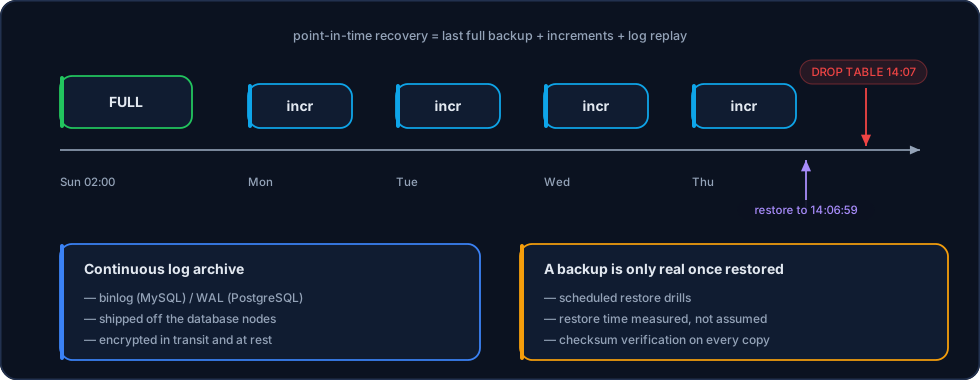
The destructive command at 14:07 is not a problem when a continuous log exists: you restore to 14:06:59.
The layers
| Layer | What it is | What it is for |
|---|---|---|
| Full backup | A complete, periodic copy | The base of any restore |
| Incremental backup | Only what changed since the previous one | Cuts window, cost and copy time |
| Continuous log archive | binlog (MySQL) / WAL (PostgreSQL) shipped continuously | Enables point-in-time recovery |
| Volume snapshot | A whole-volume copy through CSI, in seconds | Very fast restore of an entire cluster |
| Logical dump | A readable dump, portable across versions | Migration, partial extraction, major version changes |
Every layer leaves the database servers. A backup on the same disk as the database is not a backup: it is a second copy of the same point of failure.
Point-in-time recovery
The case that justifies the whole architecture is not a datacenter fire — it is the DELETE without a WHERE, the DROP TABLE in the wrong terminal, the deploy that corrupted data for three hours before anyone noticed.
With a continuous log, the restore is:
- restore the last full backup taken before the incident;
- apply the increments up to the available point;
- replay the transaction log up to the second immediately before the destructive command;
- validate and release.
What defines how much you lose is how often the log is shipped, not how often the full backup runs.
Encrypted volume snapshots
On Kubernetes clusters, on top of logical and physical backups, we use volume snapshots (CSI VolumeSnapshot): a copy of the entire volume, taken in seconds, without scanning the database.
- Consistent snapshot — the operator coordinates the flush and the write freeze before firing the snapshot, so the copied volume is restorable.
- Always on an encrypted volume — the key is managed by InteSys or supplied by the customer.
- Encrypted in transit — replicating the snapshot to another destination travels encrypted.
- Whole-cluster restore — the snapshot returns the volume's state; to reach an intermediate instant, the continuous log is still required.
| Snapshot destination | When to choose it |
|---|---|
| br-sp-1 and br-sp-2 (Brazil) | Default. Keeps data residency and processing entirely under the LGPD. |
| Another country | Geographic isolation of the backup, a corporate requirement, or a continuity plan that calls for a copy outside national territory. An international transfer then exists, documented in the solution design. |
The destination is the customer's choice, not a platform default
No snapshot leaves Brazil on our initiative. A copy in another country is configured only on request, with the legal basis for the transfer recorded alongside the cluster design.
Retention
The policy is agreed per customer, but the standard shape is tiered:
| Range | Typical retention | Use |
|---|---|---|
| Last 24–72 h | Complete continuous log | Point recovery from human error |
| Last 30 days | Dailies | Incident discovered late |
| Last 12 months | Monthlies | Contractual and audit requirements |
| Beyond that | On request | A specific legal or sector obligation |
Retention is also a disposal obligation. Personal data kept longer than necessary is a liability under the LGPD; the policy defines both how long to keep and when to delete.
Encryption and access
- At rest — every backup lives on an encrypted volume or object storage.
- In transit — transfers always go over an encrypted channel.
- Separated access — whoever administers the database is not necessarily whoever can delete backups. Retention credentials are distinct from operational ones.
- Immutability when required — retention with deletion locks, for ransomware scenarios or regulatory requirements.
Restore testing
The part almost everybody skips, and the only one that proves the rest works.
| Test | Frequency | What it validates |
|---|---|---|
| Automated restore into an isolated environment | Monthly | The backup opens, the database starts, the data is there |
| Checksum verification | On every copy | The file did not corrupt in transit |
| Sample point-in-time restore | Quarterly | The continuous log covers the promised period |
| Timed full restore | Every six months | The agreed RTO is real, not estimated |
A backup never restored is an assumption, not protection
A backup with a corrupt file, an incompatible version, or one that takes 14 hours to restore looks healthy on any dashboard. Only the test shows it.
Related Pages
- Disaster Recovery — Where backups fit into the larger plan
- Replication — A replica is not a backup: it copies the
DROP TABLEtoo - Administration — Daily verification and retention review
- Installation — The policy defined on day one
- MySQL High Availability · PostgreSQL · ClickHouse