Valkey, Redis and KeyDB — Managed In-Memory Databases
Database as a Service (DBaaS)Contact InteSys →In-memory databases keep data in RAM and answer in a fraction of a millisecond. They are the layer that takes load off the main database: caching expensive queries, user sessions, queues, counters and request limits. Valkey, Redis and KeyDB speak the same protocol (RESP), so your application uses the same client libraries with any of the three.
As part of Database as a Service, InteSys provisions, secures, monitors and maintains these databases in br-sp-1 (Cirion SAO1) and br-sp-2 (Equinix SP3), on Kubernetes or on virtual machines — from a single instance up to topologies with automatic failover and a replica in another region.
What they are for
| Use | Example | Engine feature |
|---|---|---|
| Cache | Query results, rendered pages, API responses | Strings and hashes with TTL, automatic eviction |
| Sessions | Login and shopping cart shared across application replicas | Hashes with expiry |
| Queues and events | Background jobs, asynchronous processing | Lists and Streams with consumer groups |
| Rate limiting | Per user, IP or API key | Atomic INCR with expiry |
| Lightweight messaging | Notifications between services | Pub/Sub |
| Rankings and counters | Leaderboards, most viewed, real-time counts | Sorted sets |
An in-memory database does not replace the main database
Replication is asynchronous and on-disk persistence has a loss window. Data that must not disappear — orders, payments, customer records — belongs in a transactional database such as PostgreSQL or MySQL. The in-memory database holds what can be recomputed or reprocessed.
Valkey, Redis or KeyDB?
| Valkey | Redis | KeyDB | |
|---|---|---|---|
| License | BSD-3, open source | RSALv2/SSPLv1 or AGPLv3 (Redis 8) | BSD-3, open source |
| Maintainer | Linux Foundation | Redis Ltd. | Snap Inc. |
| Execution | I/O threads, single-threaded command core | I/O threads, single-threaded command core | Multithreaded |
| Replication | Primary/replica, Sentinel, Cluster | Primary/replica, Sentinel, Cluster | Also active replica and multi-master |
| When to choose | Default for new projects and Redis migrations | Dependency on a specific Redis module or version | Active replication or heavy parallelism on one node |
In 2024 Redis moved away from the BSD license, and the community created Valkey from the last open version, under the Linux Foundation. Valkey keeps protocol and command compatibility with Redis, which is why it is our default recommendation: same application, same libraries, no licensing question. KeyDB covers specific cases such as active replication between nodes, but its development pace is slower — we evaluate it with you before adopting it.
Topologies
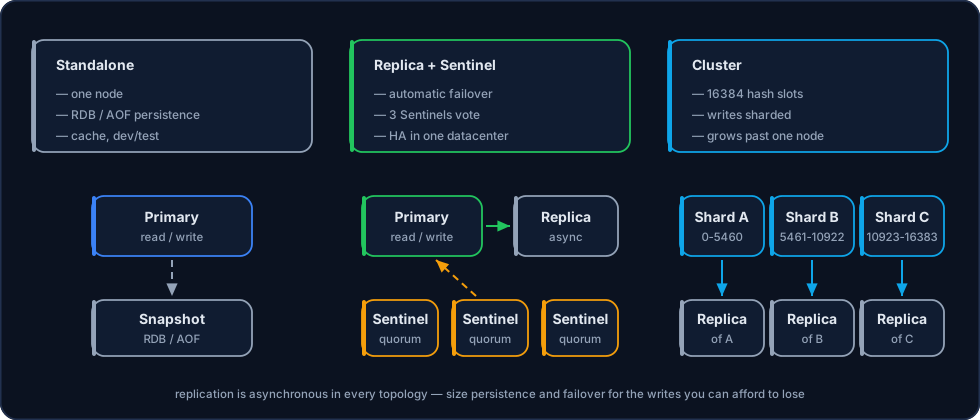
| Topology | Nodes | Failover | Write scaling | Suited to |
|---|---|---|---|---|
| Single instance | 1 | Restart or restore | One node | Disposable cache, development, staging |
| Primary + replica with Sentinel | 2+ data, 3 Sentinels | Automatic, within seconds | One node | Production sessions, queues and cache |
| Cluster | 3+ primaries, each with a replica | Automatic, per shard | Spread across hash slots | Data or traffic larger than one node |
| Active replica (KeyDB) | 2+ writable nodes | No promotion: every node accepts writes | All nodes | Specific cases where conflicts are acceptable |
- Single instance — one node, with or without persistence. If it fails, it comes back by restarting or from the last snapshot; the application has to tolerate a few moments without its cache.
- Primary + replica with Sentinel — Sentinel watches the primary and, when a majority (quorum) of the three agrees it is down, promotes the replica and tells clients the new address. This is the most common production topology.
- Cluster — data is split into 16,384 hash slots across several primaries, each with its own replica and failover, with no Sentinel. Commands touching several keys need them in the same slot (hash tags, such as
{order:42}). - Active replica — in KeyDB, nodes accept writes at the same time and replicate to each other. Concurrent writes to the same key resolve as last write wins, so it only suits workloads that tolerate that.
Asynchronous replication: a failover can lose the latest writes
The primary acknowledges a write before the replica receives it. If the primary fails in that gap, the promoted replica does not have those writes. For critical operations, the WAIT command narrows the window by waiting for replica acknowledgements — but it does not make replication synchronous.
Persistence
| Mode | Possible loss in a crash | Cost | Typical use |
|---|---|---|---|
| No persistence | The entire dataset | None | Pure cache, rebuilt from the main database |
| RDB (snapshot) | Everything since the last snapshot (minutes) | Periodic fork, memory spikes | Cache worth keeping warm, backups |
AOF everysec | About 1 second of writes | Continuous disk writes | Sessions, queues and counters |
AOF always | Practically none | High latency on every write | Rarely; prefer a transactional database |
In production the default is AOF everysec plus RDB snapshots for backup: recovery uses the AOF, and the RDB files are copied to storage off the server under the same retention policy as the other backups.
Memory and sizing
In an in-memory database, RAM caps the dataset. We size three things:
maxmemoryand the eviction policy — the limit that stops the process from exhausting the server's memory, and what happens when it is reached.- Headroom for the fork — RDB snapshots and AOF rewrites use copy-on-write; under heavy writes, memory can grow well beyond the dataset during the fork. That is why we reserve generous headroom when persistence is on.
- Fragmentation — tracked through the
mem_fragmentation_ratiometric, with active defragmentation when needed.
| Policy | Behaviour at the limit | Suited to |
|---|---|---|
allkeys-lfu / allkeys-lru | Evicts the least used keys | Cache |
volatile-lru / volatile-ttl | Evicts only keys with an expiry | Cache and permanent data in the same database |
noeviction | Rejects new writes | Sessions and queues, where silently losing data is worse than an error |
Cache and queues in separate instances
Cache wants eviction; queues and sessions cannot lose data. In one database, either policy hurts the other use. Separate instances also keep a cache spike from affecting the queues.
Multi-region
- Replica in another region — an asynchronous replica in br-sp-2 provides disaster recovery for the primary in br-sp-1, and local reads for applications in both datacenters.
- Regional cache — each region keeps its own cache, fed by the local main database or read replicas. Nothing is replicated between caches, and cross-region latency leaves the read path. See the pattern in Multi-Region PostgreSQL.
- Active replication across regions — possible with KeyDB, but with last-write-wins conflict resolution. Recommended only after the data model has been reviewed.
Security
- Private network — the database is never exposed to the internet; access only from the application network, with Kubernetes network policies or firewalls on VMs.
- TLS — encryption between application and database, and between nodes when the architecture crosses networks.
- ACLs — one user per application, with only the commands and key prefixes it needs. Dangerous commands such as
FLUSHALL,CONFIGandKEYSstay out of application permissions. - No shared password — each application has its own credential, revocable without affecting the others.
Operations and monitoring
| Metric | What it shows | Alert when |
|---|---|---|
used_memory vs. maxmemory | How close the limit is | Above 80% with no eviction configured |
evicted_keys | Cache too small | Continuous growth |
Hit ratio (keyspace_hits / misses) | Cache efficiency | Drop against the baseline |
| Replication lag | Replica behind the primary | Above the agreed limit |
mem_fragmentation_ratio | Wasted memory | Above 1.5 for a sustained period |
| Slowlog and latency | Commands blocking the core | Commands above a few milliseconds |
Version upgrades go replica by replica, with a controlled failover to upgrade the primary. Every alert has a runbook, as for the other DBaaS databases.
Service tiers
| Tier | Topology | Suited to |
|---|---|---|
| Single instance | One node, with or without persistence | Disposable cache, development and staging |
| High availability | Primary + replica with Sentinel, or Cluster | Production sessions, queues and cache |
| Multi-region | Replica in br-sp-2, or regional caches | Disaster recovery and local reads in both datacenters |
Recommended starting point
Valkey with a primary, one replica and three Sentinels, AOF everysec and RDB snapshots stored off the server. It covers the real failures of a single datacenter without the complexity of Cluster. Request a proposal to size it for your workload.
Frequently asked questions
My application uses Redis. Will it work with Valkey?
In the vast majority of cases, yes: Valkey keeps the Redis protocol and commands, and the client libraries are the same. The exception is modules and features exclusive to recent Redis versions — in those cases, we run Redis itself.
Can I use Valkey or Redis as my main database?
For data that can be recomputed or reprocessed, yes. For data that must not be lost, no: replication is asynchronous and even AOF has a loss window. The standard pattern is the in-memory database in front of a transactional one.
How much memory do I need?
The dataset size plus headroom for forks, fragmentation and growth. We measure the real dataset (or estimate it from the main database) during sizing, before provisioning.
Kubernetes or a virtual machine?
Both work. On Kubernetes, an operator manages replicas and failover close to the application. On VMs, memory isolation is more predictable for large datasets. We decide with you based on the workload.
Next Steps
- Database as a Service (DBaaS) — Service tiers, engines and ordering
- Multi-Region PostgreSQL — Regional Valkey cache in front of a remote database
- PostgreSQL High Availability — The transactional database behind the cache
- Backup & Restore — Retention and tested restores
- Kubernetes as a Service (KaaS) — In-memory databases close to the application
- Speak with an expert — Discuss your cache architecture