Database Installation
Almost every serious production database problem is born at installation time: the wrong storage, badly distributed memory, replicas on the same physical host, no failure test before the first customer. Fixing it later costs a maintenance window; getting it right beforehand costs a conversation.
This page describes how InteSys installs a new database — from sizing to a documented handover.
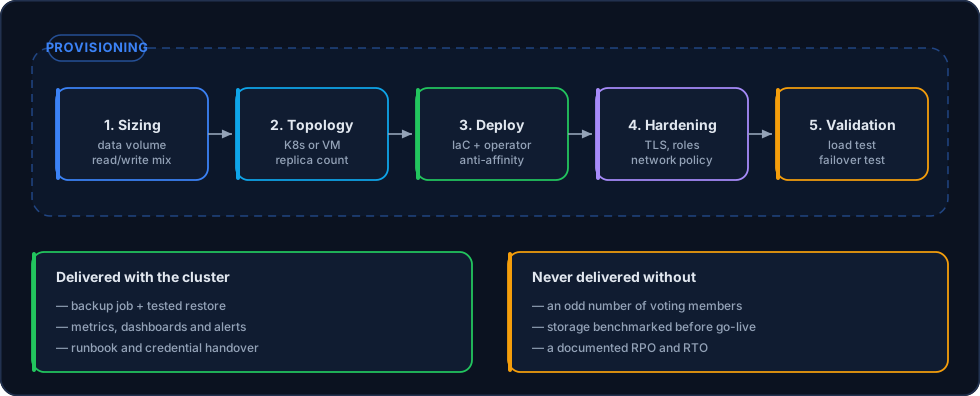
No stage is skipped, even on a small cluster — what changes is the size, not the procedure.
1. Sizing
Sizing is not picking a plan; it is answering five questions.
| Question | Why it decides the machine |
|---|---|
| How much data today, and what is the 24-month projection? | Sets disk and, above all, how much of the working set fits in RAM |
| What is the read/write ratio? | Read load scales with replicas; write load scales with hardware and schema |
| What is the peak in concurrent connections? | Determines the pool and keeps the database from dying of too many connections |
| What is the largest transaction and the largest analytical query? | Sets working memory and the risk of one query taking the server down |
| What RPO and RTO does the business accept? | Sets the replication mode and the backup policy |
Memory rule of thumb — the hot data set should fit in the database cache (buffer pool on MySQL, shared buffers plus OS cache on PostgreSQL). When it doesn't, every query becomes I/O and no parameter tuning will save it.
Storage is where most installations go wrong
Databases are sensitive to I/O latency, not to raw disk throughput. A volume with good MB/s and poor latency performs worse than a smaller, faster disk. Every InteSys installation measures write latency and volume IOPS before the database goes on it.
2. Topology
The decision that precedes any installation: Kubernetes or virtual machines.
| Criterion | Kubernetes | Virtual machines |
|---|---|---|
| Provisioning a new cluster | Minutes, declarative | Automated, but slower |
| Rebuilding a replica | Automatic, by the operator | Automated with scripts |
| Kernel, I/O scheduler and huge page tuning | Limited by the node | Full |
| Customer team familiarity | Requires Kubernetes culture | Traditional operations |
| Choose it when | The application already runs on Kubernetes | The database is the most critical, isolated component |
The details of each arrangement live in the high availability guides: MySQL, PostgreSQL, ClickHouse.
Node count — the standard installation has three database nodes (or three voters, when consensus is external). Two nodes form no quorum and turn any network partition into a manual decision.
3. Provisioning
Nothing is installed by hand.
- Infrastructure as Code — Terraform for the resources, Ansible or a Kubernetes operator for the database. The cluster is reproducible from the repository.
- Mandatory anti-affinity — one database node per physical host. Three replicas on the same hypervisor are not high availability, they are the same single point of failure copied three times.
- Dedicated volumes — data, transaction log and operating system on separate volumes, with the transaction log on low-latency storage.
- Pinned version — major and minor versions declared explicitly; upgrades are a planned event, never a side effect of a
restart.
# Illustrative manifest excerpt — the topology is declared, not typed on the server
spec:
  instances: 3
  postgresql:
    parameters:
      shared_buffers: "8GB"
      max_connections: "200"
  storage:
    size: 500Gi
    storageClass: fast-nvme
  backup:
    retentionPolicy: "30d"
4. Hardening
A freshly installed database is a target. The delivery standard includes:
- TLS required — application and replication connections encrypted; certificates managed and rotated.
- No public exposure — the database listens on a private network. Administrative access goes through a bastion or VPN, never through a port open to the internet.
- Least-privilege accounts — an application user with data privileges only, no
SUPER/SUPERUSER; separate, named administrative accounts. - Passwords out of the code — credentials in a Kubernetes Secret or a vault, injected as environment variables.
- Network policy / firewall — only the expected origins reach the database port.
- Connection auditing — a record of who connected, from where and when.
- Encryption at rest — encrypted volumes, including the ones used for snapshots.
5. Validation before go-live
A cluster is only handed over after it proves it works under stress and under failure.
- Load test — synthetic load shaped like the real application, measuring p95 and p99 latency, not the average.
- Failure test — we take the primary down in a controlled environment and measure the real RTO. If the number doesn't match what was agreed, the topology changes before production.
- Restore test — the first backup is restored onto a clean server and verified. A backup that was never restored doesn't count.
- Alert verification — every alert is fired artificially once, to confirm it reaches whoever is on call.
What is delivered with it
| Deliverable | Content |
|---|---|
| Topology document | Nodes, roles, endpoints, versions and relevant parameters |
| Runbook | Failover, replica rebuild, restore, scaling |
| Dashboards and alerts | Replication, connection, latency and disk space metrics |
| Backup policy | Frequency, retention, destination and the result of the last restore test |
| Credentials | Delivered over a secure channel, with named accounts for the customer's team |
Installation and migration travel together
If the database already exists somewhere else, installation is the first half of the work and migration is the second. The new cluster is validated before any production data is copied into it.
Related Pages
- Migration — Bringing the existing database into the new cluster
- Replication — Modes and topologies configured at installation
- Backup & Restore — The policy defined on day one
- MySQL High Availability · PostgreSQL · ClickHouse
- InteSys Datacenters — Where the cluster is provisioned