Database Migration
Database migrations are frightening because the naive version of a migration is bad: stop the application, export everything, import everything, hope. On a 500 GB database that is a whole night of downtime and no way back.
The migration InteSys runs is a different one: the new database is filled and kept in sync while the old one keeps serving production. The real pause happens only when the address is flipped, and it lasts seconds.
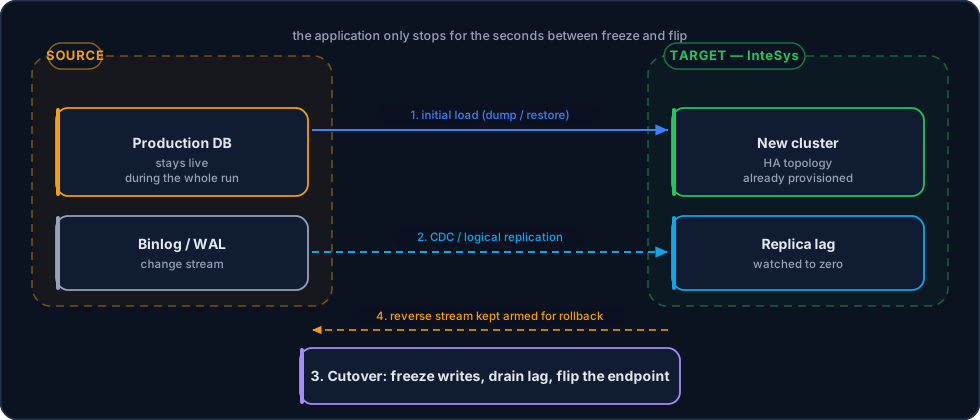
The reverse stream stays armed after cutover: that is what makes rollback possible.
Where customers usually come from
| Origin | Typical complication |
|---|---|
| Self-hosted server / colocation | Old version, no replica, and a backup that was never restore-tested |
| Foreign provider | Poor latency for Brazilian users and international transfer of personal data |
| Public cloud managed database | Growing cost, little parameter control, expensive egress on the way out |
| Application VM | Database sharing a host with the application, competing for CPU and I/O |
Leaving a foreign provider has, beyond the latency gain, a compliance effect: the data comes under Brazilian sovereignty, with no international transfer to document.
1. Assessment
Before a single byte moves:
- Inventory — databases, schemas, size per table, storage engines, extensions and character sets.
- Versions — source and target versions. A major version jump is a migration and an upgrade: two risks, and sometimes worth separating.
- Hidden dependencies — triggers, stored procedures, cron jobs, users with special privileges, replication that already exists.
- Workload profile — write peaks and heaviest queries, to size the target.
- Window requirement — how much downtime the business tolerates. That number decides the method.
2. Choosing the method
| Method | Downtime | When to use it |
|---|---|---|
| Dump and restore | Hours, proportional to size | Small databases or environments that can stop overnight |
| Physical backup + replication | Minutes | Same major version and engine; the replica is built from the backup and catches up |
| Logical replication / CDC | Seconds | The default for critical production; tolerates version changes and schema adjustments |
| Application blue/green | None perceived | When the application can write to both sides during the transition |
In practice, almost every production migration uses logical replication or CDC: logical replication on PostgreSQL, GTID-based binlog replication on MySQL, or a change data capture tool when source and target are heterogeneous.
3. Initial load
The target is filled with a consistent copy of the source, marked with the exact transaction log position (GTID on MySQL, LSN on PostgreSQL). That mark is what allows replication to resume with no gap and no duplicate.
During the initial load, the source database keeps serving production normally.
Indexes after the data
On large databases, loading data with secondary indexes already in place is several times slower. The order is: schema without secondary indexes → data → indexes → constraints → statistics.
4. Continuous sync
Once the load finishes, the target starts consuming the source's change stream and lag drops to seconds. This state can last hours or days — and that is exactly what gives you freedom to choose the cutover time.
Inside that window we run the cold validation:
- row counts per table on both sides;
- checksums on samples of the critical tables;
- comparison of sequences,
AUTO_INCREMENTvalues and schema objects; - running the application's heaviest queries against the target, comparing execution plan and time.
5. Cutover
The only moment of downtime. A typical procedure takes two to five minutes end to end, with seconds of actual unavailability:
- Freeze writes — the application goes read-only or the pool is paused.
- Drain the lag — wait for the target to reach zero lag. This is the step that sets the duration.
- Verify — one last count comparison on the highest-write tables.
- Flip the address — DNS, connection string or, preferably, the proxy (ProxySQL, PgBouncer) starts pointing at the new cluster.
- Release writes — the application returns to normal, already on the new database.
- Arm the way back — reverse replication (target → source) is switched on.
Rollback has an expiry date
The way back only exists while reverse replication is running and the source is intact. We agree a rollback window with the customer — usually 24 to 72 hours — and only after it does the source get switched off.
6. Stabilization
In the first hours and days after cutover:
- heightened monitoring of latency, connection errors and slow queries;
- performance compared against the baseline collected before the migration;
- parameter tuning against real load, not synthetic;
- first full backup on the target, with a tested restore;
- first failover test in the new environment.
Known risks and how we handle them
| Risk | Handling |
|---|---|
| Collation difference between source and target | Compared during assessment; ordering and keys verified before cutover |
Misaligned sequence / AUTO_INCREMENT | Repositioned at cutover, before writes are released |
| Table with no primary key | Blocks CDC in several tools; handled at assessment, not at the flip |
| Non-replicated object (trigger, job, user) | Migrated explicitly by checklist, not by the data stream |
| Application with a hard-coded address | Identified beforehand; the proxy removes the dependency |
Related Pages
- Installation — The target cluster, provisioned and validated first
- Replication — The mechanisms used during the migration
- Backup & Restore — First backup and test in the new environment
- Administration — Operations after stabilization
- Contact Us — Request a migration assessment